

 Slovak
 Hungarian
 Polish
 German
 Spanish
Buildings
Keep your site staffing fully under control
 Help
Help
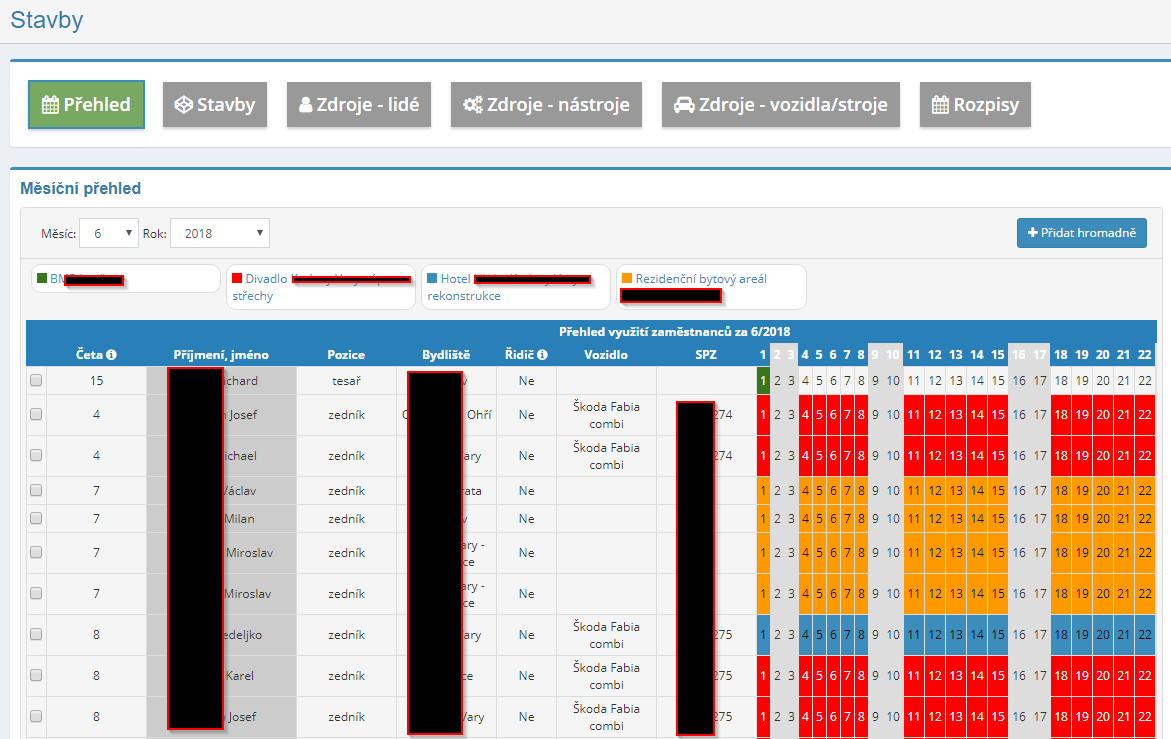
The Buildings module handles construction management and the planning of human and technical resources, vehicles and machines across your sites. Assign the right people, tools and equipment to a specific project within an exact from–to period.
When you assign a worker, the system checks whether they are already booked elsewhere in the same period. If there is a clash, a warning shows the site they currently work on. A filter also finds free staff for any required date range.
Attach a vehicle or machine to a site and build its crew straight from the people already on the project. The site manager then sees who drives which plate and can plan transport and logistics with ease.
Add notes to each site using your own note types with an icon and colour. Send the update by e-mail or SMS to everyone assigned, with attachments or as a blind copy if needed. The crew gets deadlines and project changes right away.
What can you use the Buildings module for?
-
A full record of every site
For each site you keep the client, address, person responsible for delivery, site technicians and the construction period. Colour coding keeps overviews easy to read.
-
Bulk staffing
Search for free employees on a given date, tick them and add them to a site in one step. It saves real time with larger crews.
-
Assigning site tools
Split machines and tools from the asset register across projects by the piece. The system watches the available count and flags tools fully used elsewhere.
-
Work calendars and schedules
Yearly and monthly schedules show how people, tools and vehicles are deployed. Each day of the month has its own column, coloured by site.
-
A clear view of who works where and when
The Overview tab joins staffing and vehicles into one table. Filter by site, trade, crew, person, place of residence or plate.
-
Attachments and internal notes
Drag drawings and documents into the Dropzone area to attach them to a project. An internal note keeps the details your crew needs close at hand.
-
Controlled access rights
Decide who sees only their own assigned sites, who sees them all, and who may write or delete. Schedules can be opened to selected people only.
Connections to other modules
The Buildings module draws data from other parts of eIntranet, so you plan resources from one place without retyping anything.
Construction Module – comprehensive construction scheduling
With eIntranet.net you’ll get a tool that lets you efficiently assign human and technical resources directly to individual projects. This module saves time on manual schedule creation and reduces the risk of overbooking or underutilizing equipment.
- Intuitive worker scheduling – assign workers based on skills, availability, and current project capacity.
- Technical resource planning – schedule vehicles, machines, and equipment according to construction activity requirements.
- Real‑time updates – changes in the schedule are immediately reflected across all connected modules (CRM, HR, accounting).
- Cost reduction – automatic optimizations shorten wait times for equipment and cut unnecessary rentals.
- Productivity increase – team capacities are displayed clearly, speeding up task allocation decisions.
Add the Construction Module to your eIntranet.net and take control of project scheduling in real time. Boost productivity, reduce costs, and maintain control over every detail.